"Great, essential to scale your DTC brand"
"saved us hours every week."
"beats Foreplay in pricing, hands down."
Build Creative Diversity Before Your Competitors Do.
Spreshapp helps you find, save and organize them, so your next creative launches with confidence.
 Install Chrome extension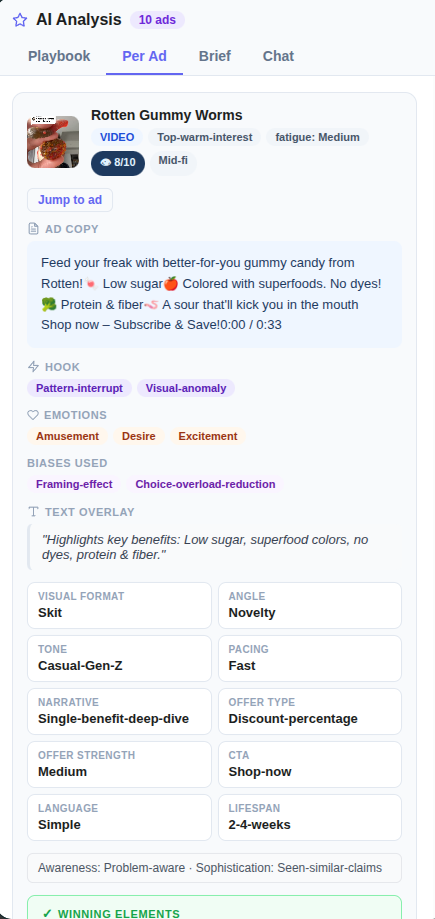
TRUSTED BY BRANDS WORLDWIDE




Why Media Buyers Choose SpreshApp
Creative diversity gaps are killing your account health
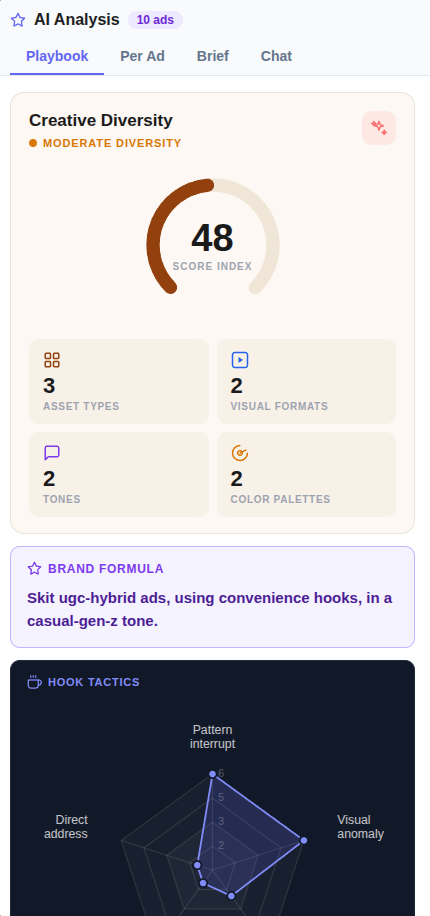
Facebook's algorithm punishes accounts that run the same creative angles repeatedly. SpreshApp's Creative Diversity Score shows you exactly where your gaps are, so you can fix them before CPMs spike.
You're spending hours screenshotting competitor ads
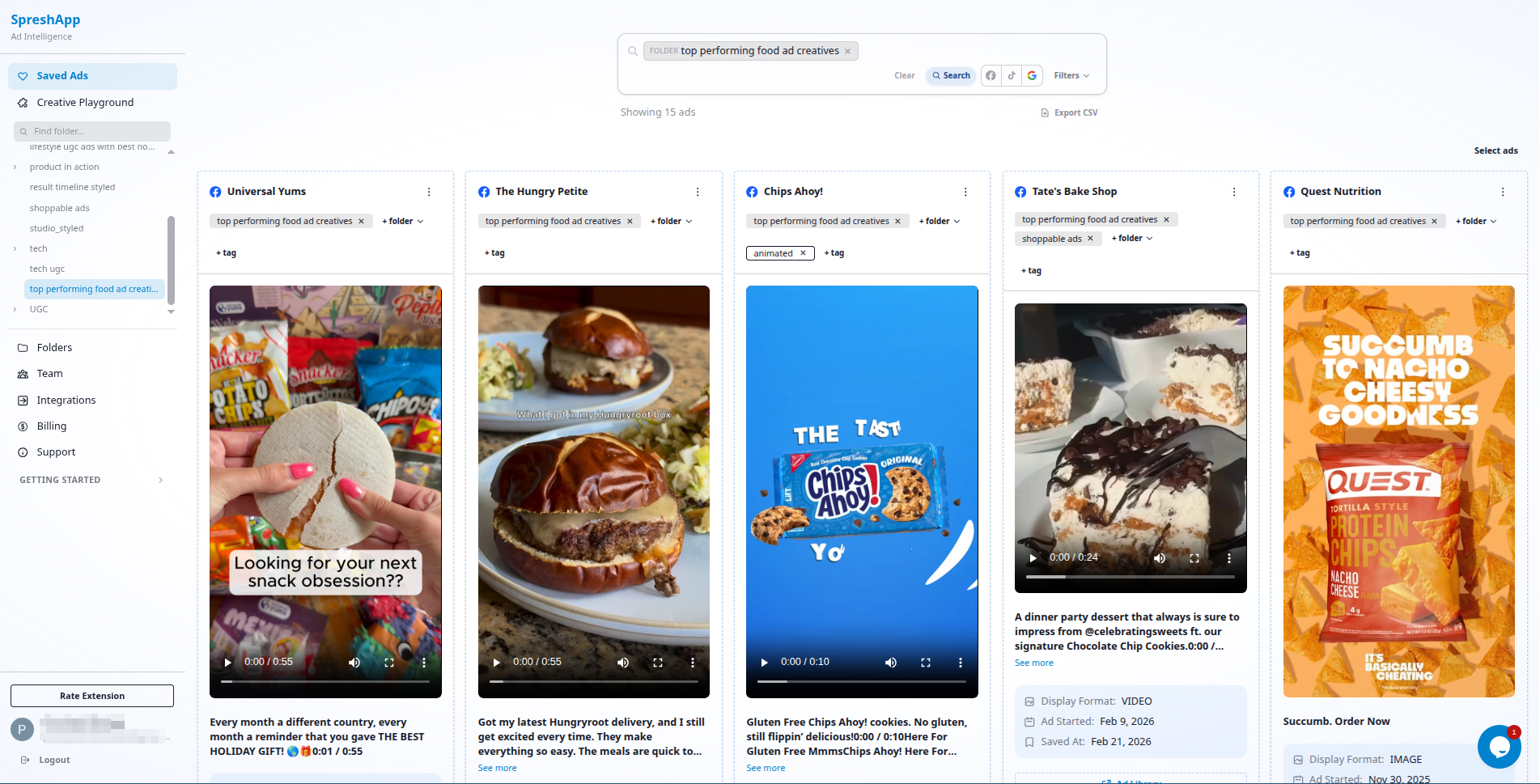
Manual research is slow and disorganized. SpreshApp lets you save ads directly from the Facebook Ads Library with one click, automatically capturing copy, images, and video links in a structured dashboard.
Reporting creative insights to clients is tedious
Clients want to know what competitors are doing. SpreshApp folders let you package research by niche or campaign, share a link, and present competitive intelligence without building slide decks from scratch.
How Media Buyers Use SpreshApp
Pre-launch competitive audit
Before taking on a new client, save 50-100 ads from their competitors. Analyze the dominant creative patterns with AI, identify gaps, and walk into the kickoff call with a data-backed creative strategy already mapped out.
- 1. Research competitor ad accounts in the Facebook Ads Library
- 2. Save 50-100 competitor ads using the Chrome extension
- 3. Run AI analysis to identify dominant patterns
- 4. Map creative gaps and opportunities
- 5. Present a data-backed creative strategy in kickoff
Ongoing competitive monitoring
Set a weekly habit of browsing competitor ad accounts in your niche. Save new creatives, tag them by angle, and watch for shifts in messaging or offers. Catch competitor pivots before they eat into your client's market share.
- 1. Schedule weekly competitor research time
- 2. Save new creatives as they appear
- 3. Tag by angle, format, and competitor
- 4. Track shifts in messaging or offers over time
- 5. Adjust client strategy based on competitor moves
Creative testing roadmap
Use saved ads to build a testing roadmap. If competitors are heavy on UGC but light on founder-led videos, that's an angle worth exploring. If everyone's running 15-second hooks, test 30-second storytelling. Let competitor spend inform your test prioritization.
- 1. Analyze competitor creative mix in saved library
- 2. Identify under-tested angles in the market
- 3. Build a prioritized testing roadmap
- 4. Allocate budget to angles with proven gaps
- 5. Track performance against competitive benchmarks
Pricing
Choose the plan that fits your workflow. Toggle monthly vs annual billing and start scouting today.
Solo
1 seat
Billed annually
Get SoloGrowth
5 seats
Billed annually
Get GrowthAgency
10 seats
Billed annually
Get AgencyWorks with your AI tools




Need more? Contact us for custom plans and enterprise solutions.
Contact SalesFAQ
Everything you need to know before you start.
How does SpreshApp help with account health and CPM?
How does SpreshApp help with account health and CPM?
Facebook rewards creative diversity. SpreshApp's Creative Diversity Score analyzes your saved ads and shows you which angles are over-represented and which gaps exist. Diversify your creative mix and watch CPMs stabilize.
Can I track multiple competitor ad accounts?
Can I track multiple competitor ad accounts?
Yes. Save ads from any ad account visible in the Facebook Ads Library. Tag them by competitor or niche, and build a comprehensive view of the competitive landscape across all your clients.
How does the AI analysis work?
How does the AI analysis work?
Click on any saved ad to see an AI-generated breakdown of the hook, offer, creative format, and target audience patterns. Chat with your entire saved library to find patterns across hundreds of ads in seconds.
Is SpreshApp compliant with Facebook's terms of service?
Is SpreshApp compliant with Facebook's terms of service?
SpreshApp uses publicly available data from the Facebook Ads Library. We don't access private ad accounts or scrape non-public information. The tool simply makes public data more usable and organized.
Can I export my saved ads for client reports?
Can I export my saved ads for client reports?
Yes. Export saved ads as CSV with all metadata, or share curated folders via link. Many media buyers use folder links as living competitive intelligence documents for clients.